
The ability to configure the experiment field values displayed on the card view of experiment
Solution: As per the current design of the tool, maximum four fields can only be displayed in the card view of experiment information and are shown in alphabetical order only. Beyond four fields if extra filed is present, as per the hierarchy the fifth one will not be seen in card view.
Here’s how the card view works:
The system displays up to four fields in alphabetical order.
Fields with capitalized names are prioritized over those in lowercase. For example, between "Department" and "department," the system will display "Department."
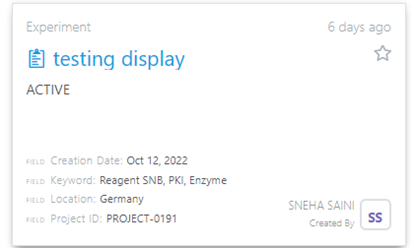
For example: As seen below new fields are added in the experiment template. In scenario one the newly created four fields are seen in display view of experiment and in alphabetical order whereas in scenario two experiment was created from notebook so until location the fields are seen in grid (in alphabetical order), but project id is not.
Scenario one: Scenario two:

Comments
0 comments
Article is closed for comments.